Your MCP Server Is a Privileged Proxy. Authenticate It Like One.
An MCP server holds credentials and a network position, and every caller borrows both. Four recent disclosures, one now on CISA's KEV list, show what happens when it trusts something weaker than authentication, and how to fix it.

In this article (9 sections)
- Why an MCP server is a privileged proxy
- Failure 1: A fallback that turned a 401 into a session
- Failure 2: A session ID is not an identity
- Failure 3: The server's network position is also authority
- Failure 4: Skipping a check because a value was missing
- The same shape, one more time: deny lists drift
- Do not forget the config files
- A checklist for this week
- Sources
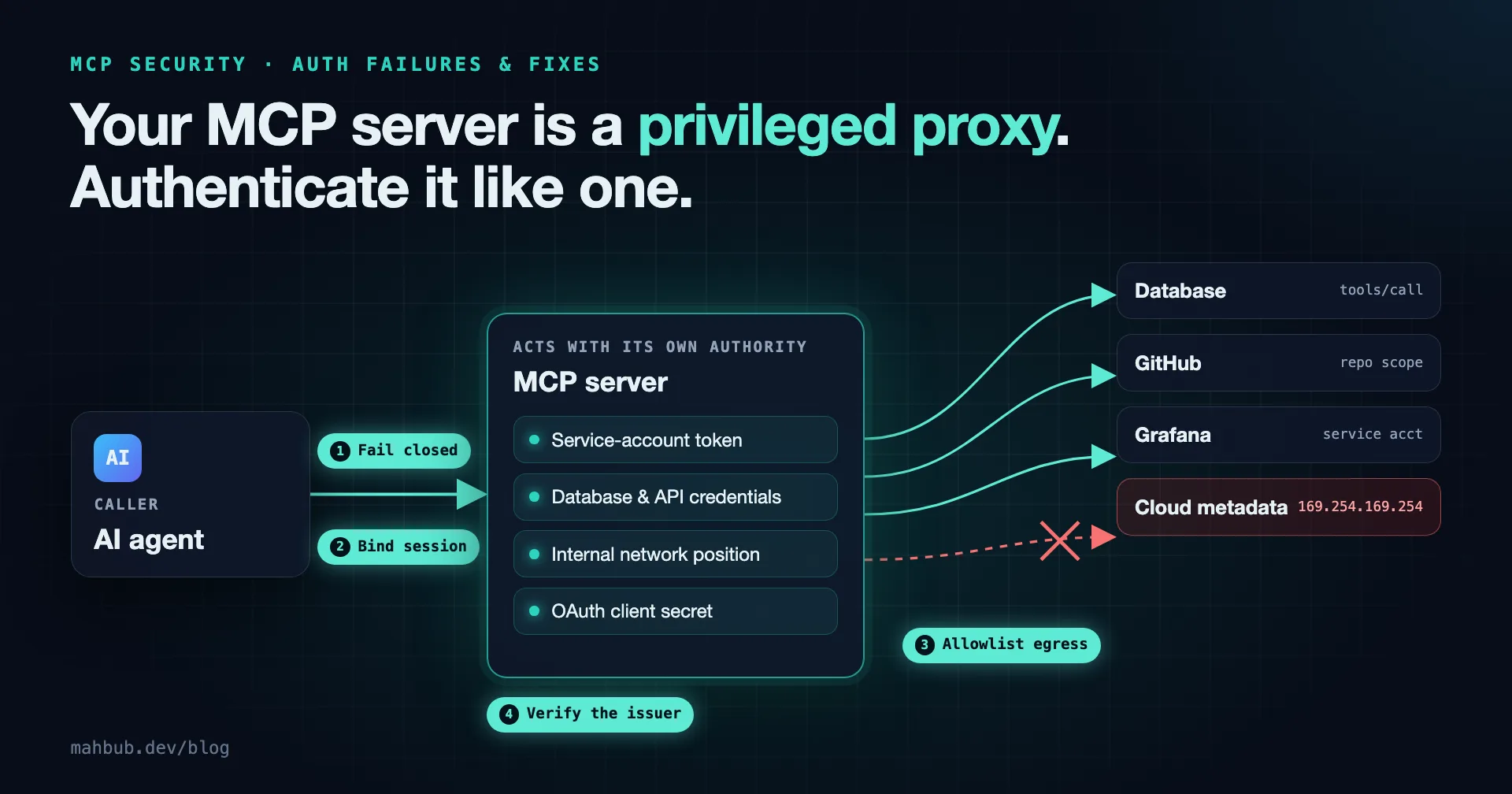
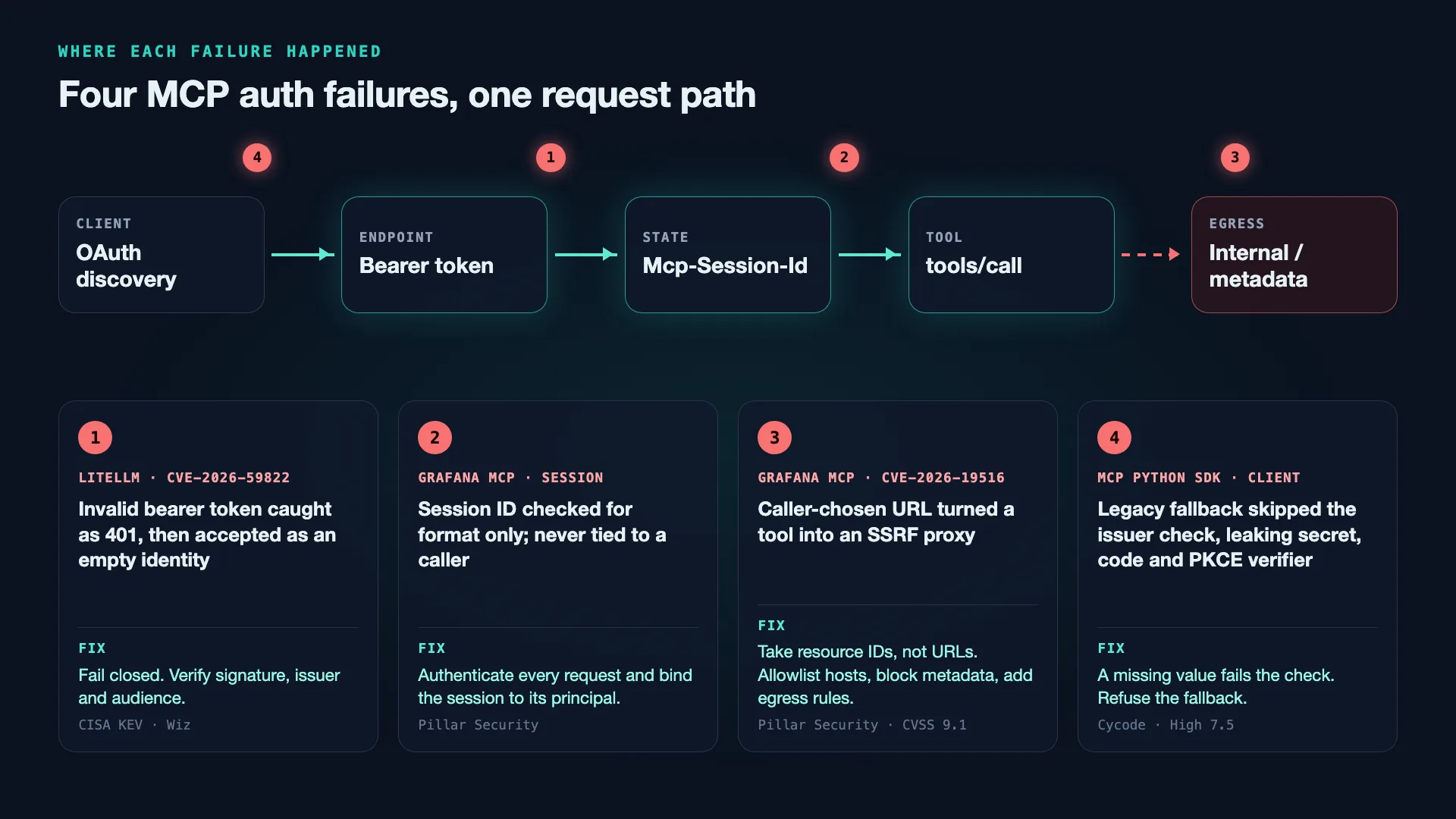
An MCP server is not a thin adapter between an AI agent and your tools. It holds a service account, an API token or a database login, and it sits somewhere on your network. Whoever can call it borrows both. In the last two months, four separate MCP security disclosures came down to the same mistake: the server treated something weaker than authentication as if it were authentication. One of them, an authentication bypass in LiteLLM's MCP endpoint, was added to CISA's Known Exploited Vulnerabilities catalog on 2 September 2026.[1] The fix is not a better prompt filter. It is ordinary backend discipline: authenticate every request and fail closed, bind sessions to identities, restrict where the server can connect, and never skip a check because a value is missing. This post walks through each failure, the fix, and code you can adapt.
Why an MCP server is a privileged proxy
When an agent calls a tool, the tool does not run with the agent's permissions. It runs with the MCP server's. Pillar Security put it plainly in their Grafana MCP research: the server acts with its own credentials and network access, not the caller's, so it must establish who is making the request, what they are allowed to do, and which systems it may reach on their behalf.[2]
That makes the threat model familiar. An MCP server is a privileged proxy, the same category as an API gateway or a CI runner holding deploy keys. Every lesson we already learned about those applies, and the incidents below are what happens when they are forgotten.
Failure 1: A fallback that turned a 401 into a session
LiteLLM is a popular open-source LLM gateway that can also front MCP servers. Its MCP endpoint had a separate authentication handler designed to accept either a LiteLLM key or an OAuth token meant for an upstream provider. When a bearer token failed LiteLLM validation, the handler caught the 401 and continued with an empty auth object instead of rejecting the request.[3] Wiz showed that a single-character token, Authorization: Bearer a, was enough to create a fully authenticated MCP session and call tools with arbitrary arguments. This is CVE-2026-59822, and Wiz reports observing it exploited in the wild.[3] In the same research, 9.6% of 3,074 internet-facing LiteLLM instances accepted the default master key or required no authentication at all.[3]
The lesson: "this is not my token" and "this is a valid token for someone else" are different conclusions, and only real validation can tell them apart. If validation fails, the request fails. There is no default identity.
import { createRemoteJWKSet, jwtVerify } from "jose";

const ISSUER = "https://auth.example.com";
const AUDIENCE = "https://mcp.example.com"; // tokens minted for this server only
const JWKS = createRemoteJWKSet(new URL(`${ISSUER}/.well-known/jwks.json`));

export async function authenticate(req: Request): Promise<Principal> {
  const header = req.headers.get("authorization") ?? "";
  const token = header.startsWith("Bearer ") ? header.slice(7) : "";
  if (!token) throw new HttpError(401, "missing token");

  try {
    const { payload } = await jwtVerify(token, JWKS, { issuer: ISSUER, audience: AUDIENCE });
    return { sub: String(payload.sub), scopes: String(payload.scope ?? "").split(" ") };
  } catch {
    // Never fall through to an empty or default principal.
    throw new HttpError(401, "invalid token");
  }
}
Checking the audience matters as much as the signature. A token issued for a different service should not open this one.
Failure 2: A session ID is not an identity
MCP's HTTP transport uses an Mcp-Session-Id header to tie requests to server-side state. In affected Grafana MCP releases, the server checked that the session ID looked right, but not that anyone had authenticated to get it. Pillar generated a value in the expected format, with no credential at all, and the server accepted tools/list and tools/call, including a tool that called Grafana using the service-account token stored on the server.[2] Grafana added optional bearer-token authentication in v1.1.0 within hours of triage.[2]
Session state is useful, but it is not a security boundary unless it is bound to an authenticated principal and re-checked on every request:
const sessions = new Map<string, { sub: string; expiresAt: number }>();

export async function resolveSession(req: Request) {
  const principal = await authenticate(req); // every request, not only `initialize`
  const id = req.headers.get("mcp-session-id");
  const session = id ? sessions.get(id) : undefined;

  if (!session || session.sub !== principal.sub || session.expiresAt < Date.now()) {
    throw new HttpError(404, "unknown session"); // client must re-initialize
  }
  return { principal, sessionId: id };
}
The server issues session IDs itself, from a cryptographically secure source, and only after authentication succeeds. A client-supplied ID that the server never issued is simply unknown.
Failure 3: The server's network position is also authority
Authentication decides who may call a tool. It does not decide where that tool can make the server connect. Grafana MCP's grafana_api_request tool accepted an X-Grafana-URL header, so a caller could choose the destination, method, path, body and headers of an outbound request. Grafana already refused to send its service-account token to a foreign host, but the server still made the request and returned the response.[2] That is server-side request forgery, CVE-2026-19516, rated CVSS 9.1, and it reaches internal services and cloud metadata endpoints that the caller could never reach directly.[2]
The strongest fix is design: a tool should take a path or a resource ID, not a URL. When a URL is unavoidable, allowlist destinations and check what the hostname actually resolves to:
import { lookup } from "node:dns/promises";

const ALLOWED_HOSTS = new Set(["grafana.internal.example.com"]);

export async function assertAllowedDestination(raw: string) {
  const url = new URL(raw);
  if (url.protocol !== "https:") throw new Error("https only");
  if (!ALLOWED_HOSTS.has(url.hostname)) throw new Error(`host not allowed: ${url.hostname}`);

  const { address } = await lookup(url.hostname);
  if (address.startsWith("169.254.") || address.startsWith("127.") || address === "::1") {
    throw new Error("resolved to a blocked address");
  }
  // Connect to `address` so DNS cannot change between this check and the request.
  return { url, address };
}
Pair this with egress rules at the network layer. Code checks catch mistakes; firewall rules catch the code you did not write.
Failure 4: Skipping a check because a value was missing
The client side failed too. Cycode found that the official MCP Python SDK, versions 1.9.1 through 2.1.1, could be tricked by a malicious MCP server into sending a client secret, an authorization code and the PKCE verifier to the attacker, which is enough for full account takeover. Cycode rated it High, 7.5.[4]
The mechanism is worth studying. If the server answered the discovery request with a 404, the SDK fell back to an older flow in which the expected authorization server URL was empty. The issuer check was guarded by if auth_server_url is not None, so on that path it never ran, and the attacker's metadata was accepted as-is.[4] The user saw their real login page, because the attacker pointed the login URL at the real provider. Only the token exchange went to the attacker.
The rule: a missing input to a security check is a failure, not a pass.
if expected_issuer is None:
    raise AuthError("authorization server unknown; refusing legacy discovery")
validate_metadata_issuer(metadata, expected_issuer)
Update any client built on the SDK to a patched release listed in the advisory.
The same shape, one more time: deny lists drift
A smaller advisory shows how these bugs survive a fix. The Obot MCP gateway blocked direct access to /mcp-connect/ with a prefix deny list after an earlier bypass. A composite route, /mcp-connect-composite/{mcp_id}, did not match that prefix but reached the same proxy handler, so the authorization check fell through and allowed the request.[5] Deny lists describe what you remembered to block. Allowlists describe what you meant to expose, and new routes are closed until someone opens them.
Do not forget the config files
MCP client configuration files such as .mcp.json, .cursor/mcp.json and .vscode/mcp.json are designed to be committed so a team shares the same tools. Hush Security analysed about 82,000 of them on public GitHub and found that 12% of credential slots hardcode a secret, 55% of those secrets have no recognisable token shape that scanners like gitleaks or GitHub secret scanning can match, and 24% are broad-scope and non-expiring by design.[6] Treat these files as credential stores: reference secrets with ${VAR} expansion or a secret manager, and give each server the narrowest, shortest-lived credential that works.
A checklist for this week
Fail closed. Any authentication error ends the request. No fallback identity, no "pass it upstream and hope".
Validate audience and issuer, not just the signature. Tokens should be minted for this MCP server.
Authenticate every request and bind each session ID to the principal that created it.
Treat outbound requests as privileged. Prefer resource IDs over URLs, allowlist hosts, block metadata and loopback addresses, and add egress rules.
Allowlist routes and tools. Expose only what the task needs.
Never skip a check on a missing value. Missing means reject.
Patch the stack. LiteLLM and the MCP Python SDK have fixed releases, and Grafana MCP added inbound authentication in v1.1.0. Check the version you actually run and read each vendor's advisory.
Audit committed MCP configs for literal secrets, including in Git history.
None of this is new security engineering. That is the point. MCP servers deserve the same scrutiny as any other service that holds credentials, and right now attackers are checking whether they get it.
Sources
CISA, Known Exploited Vulnerabilities Catalog, entry CVE-2026-59822, added 2 September 2026.
Pillar Security, Valid, But Never Issued: Session Spoofing and SSRF in Grafana MCP, 2 September 2026.
Wiz, Off Guard: Breaking LiteLLM from Authentication Bypass to Cloud Compromise.
Cycode, Cycode Uncovers Account Takeover in MCP Python SDK, 29 September 2026.
Obot, GHSA-6fwv-3h4c-37j9, 17 September 2026.
Hush Security, The State of MCP Configuration: the Identity Security Gaps, August 2026.